Get paid and refund a buyer
Buyers pay your own Stripe account directly. You manage payouts and refunds in Stripe. OpenCEU has no refund button. When you refund in Stripe, OpenCEU removes the learner's access automatically, and a certificate they already earned stays.
Connect Stripe to get paid
Go to Settings and find the Payments card. Click Connect Stripe to get paid and finish Stripe’s steps. If you stop partway, the card shows Setup incomplete and the button reads Finish setting up payouts. When it is done, the card shows Payouts active.
Sales go straight to your Stripe account. OpenCEU takes 0%. Stripe charges its own processing fee of about 2.9% plus 30 cents per sale. Free content needs no setup.
If you see a Coming soon card

Find your payouts and payment history
Payouts, refunds, and payment history all live in your Stripe dashboard. Click Open Stripe dashboard on the Payments card in Settings, or Payouts in Stripe on your host dashboard. Both links are for organization admins.
Your host dashboard also shows Sold and Net sales. After a refund, Net sales reads “after 1 refund” (or the count). Free comp registrations from 100% codes show as Comped, outside net sales.
Refund a buyer in Stripe
Open your Stripe dashboard, find the payment, and refund it there. You decide who gets a refund. The terms say you handle refunds for events you host.
What happens to the learner's access
When Stripe reports a full refund to OpenCEU, the purchase is marked refunded and the learner loses access to what that purchase covered. This also happens when a learner files a chargeback with their bank.
- A partial refund does not remove access. Only a refund of the full amount does.
- A recording or live ticket: the learner can no longer watch the recording or join the paid session.
- A conference ticket: every session that came with that registration is removed. A session the person also bought on its own stays.
- A single session refund does not remove access if the person also holds a paid conference registration covering that session.
- A bundle: every course the bundle gave them is removed. A course they bought separately stays.
- A conference ticket upgrade (a general ticket upgraded to a CEU ticket after registering) that is refunded puts the person back on the general ticket.
Sponsor package refunds work differently. See Sell sponsor packages.
What happens to a certificate already earned
Nothing. A certificate a learner already earned stays valid after a refund. The terms say the same: a legitimately earned CEU certificate is a record of completed continuing education, and issuing a refund does not revoke it. A refund only stops future watching and access.
If the sale used a code
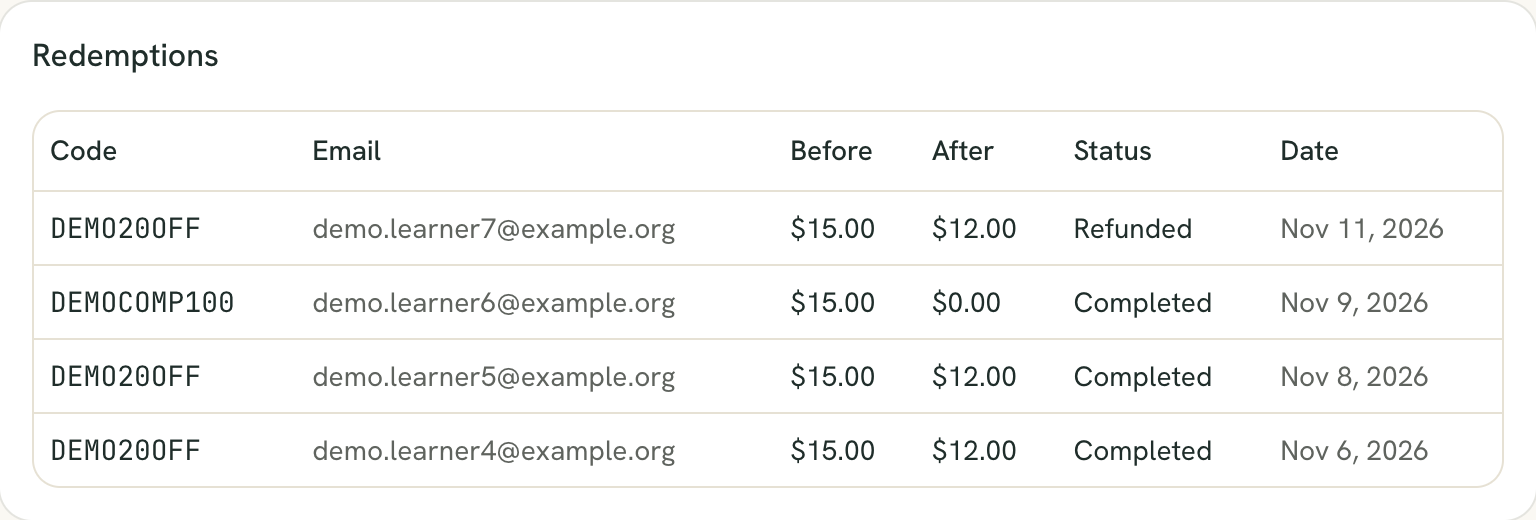
The code’s redemption is marked refunded on the Redemptions list. It still counts against the code’s Max uses, so a capped code can’t be reused by buying and refunding. See Create discount and comp codes.
Still stuck? Contact support and we'll help.