Your audience
Your audience is one list of everyone who registered for any of your events. Each person appears once, no matter how many events they joined. Use it to see who keeps coming back and how far people got.
Open Your audience
On your host dashboard, click Your audience next to New event. The page is titled Your audience. Two numbers sit at the top: People and Certified.

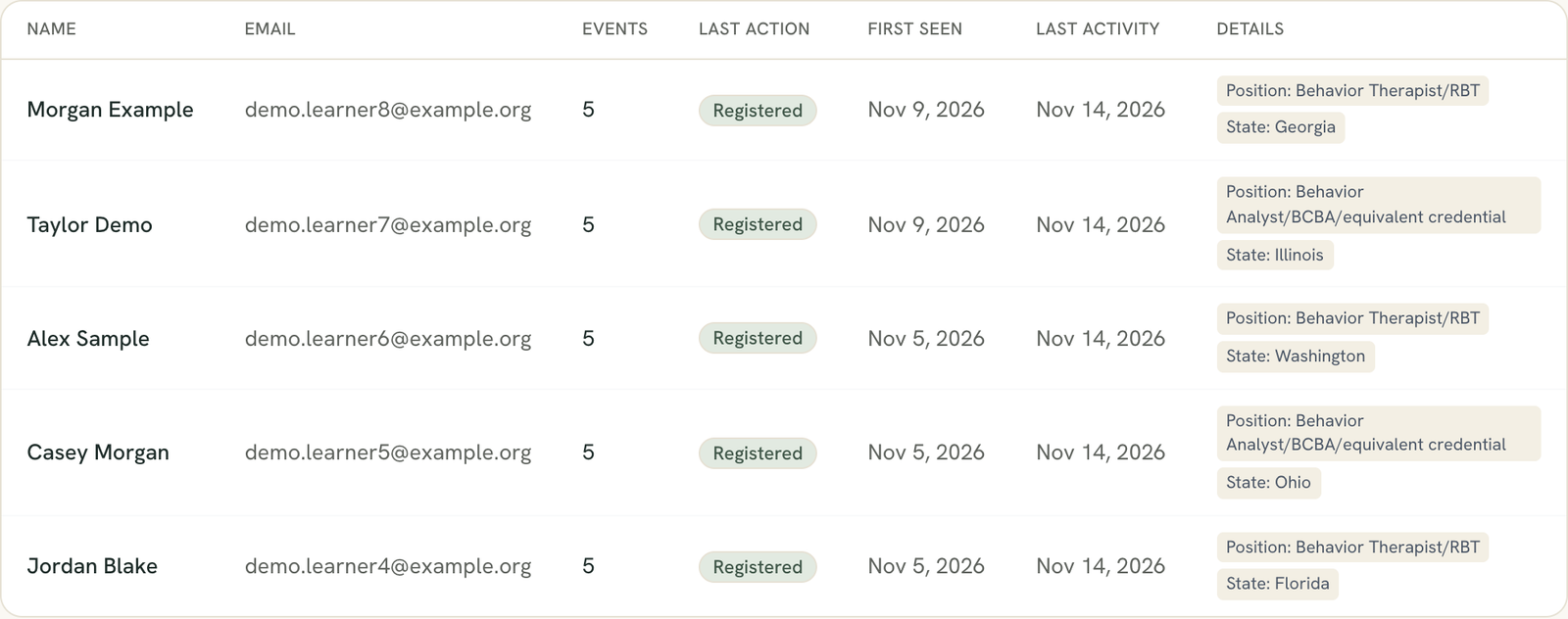
Read the columns
- Name and Email. People are matched by email address, so one person with two registrations is one row. If the name differs between registrations, the most recent one shows.
- Events. How many of your events they registered for.
- Last action. The furthest point they reached across your events: Registered, Took quiz, Passed CEU, or Certified.
- First seen. Their earliest registration.
- Last activity. The date of that last action, or their latest registration if they only registered.
- Details. Their position, their state, and their answers to your registration questions, merged across events. If they answered the same question twice, the latest answer shows.
The list is sorted by last activity, newest first. Test events and placeholder accounts are left out.
Page through a long list
The table shows 500 people per page, with Previous and Next at the bottom. The counts at the top and the CSV always cover everyone, not just the page you are on.
Export the list
Click Export CSV at the top right. The button doesn’t appear until you have at least one registrant. The file is named host-audience.csv. Its columns are Name, Email, Events, Last action, First seen, and Last activity, then one extra column for each form field anyone filled in, such as Position, State, and your own questions. The two dates are year-month-day.

This list does not show marketing consent
If the page says it couldn't load
You may see “We couldn’t load your audience right now.” Your data is fine. Refresh in a minute. If it keeps happening, contact support. The page never shows an empty list when a load fails.
Still stuck? Contact support and we'll help.